
This article and attached document describes how the timing is handled in NaviSuite - NaviPac, NaviScan and Kuda Core.
ZDA/UTC strings must come together with the PPS signal in order to have a proper time synchronization (PPS must be connected in combination with ZDA or UTC - only applies to serial RS232 port). It is possible to have a low quality synchronization only with the ZDA in NaviScan but this can be very inaccurate and thus not recommended unless all sensor data already contains time in the string or interface through EIVA ATTU.
The ATTU can be used as a NTP server by typing in ATTU IP Address (example shows default IP) in Windows Internet time settings.
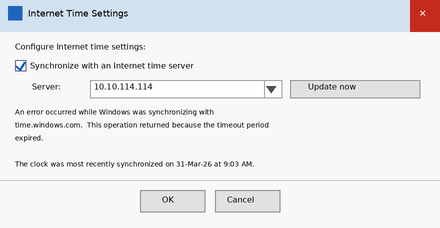
Windows Internet Time Settings
In general when using NTP it is recommended to change the frequency of when windows adjust the computer clock in Windows Registry settings. It is default only once a week. !
NaviPac only works with the ZDA string that arrives after the pulse and UTC string that arrives before the pulse.
Naviscan allows a bit of flexibility on this by allowing the user to set when the pps pulse is coming. Based on the PPS method chosen the option PPS after data enables and can be set on or off.
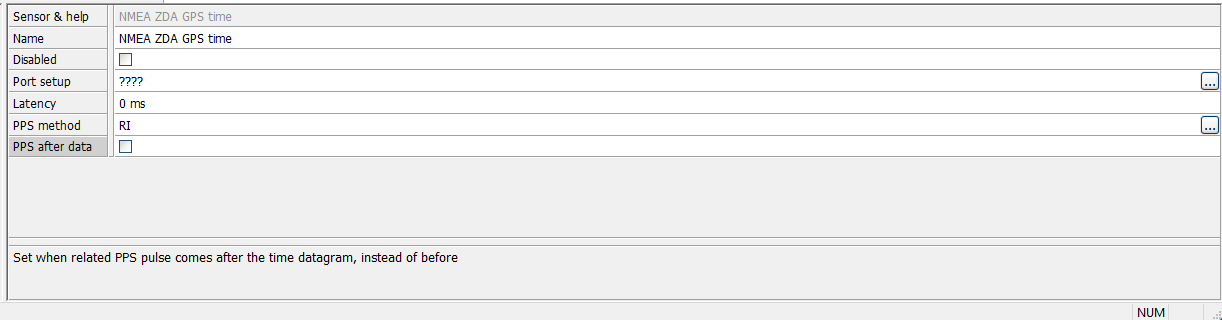 NaviScan - PPS method and PPS after data option
Both software respond to the first change in the PPS signal (either low-high or high-low). NaviPac and NaviScan ignores any additional signals within 200 ms of a PPS pulse to prevent duplicate time syncs. The duplicates of the PPS signals (seen in the Instrument spy picture from below) are caused by Windows as it registers changes on the control pins. The time tag will be performed at the first PPS count delta T time ignoring the next identical PPS count number.
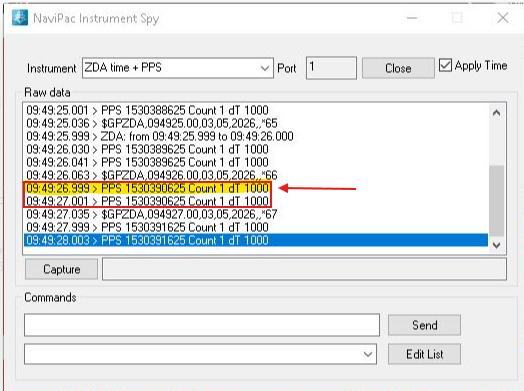
NaviPac Instrument Spy - Incoming ZDA and PPS
NaviPac/NaviScan time sync is performed twice per minute for potential PC time adjustment. Also, around day shift no time adjusting is happening to avoid any windows date rollover.
Table of contents for the Timing principles document attached:
1 Fundamentals
2 Simple timing
3 Timing supported by external information about latency of data
4 Synchronising with external clock
4.1 Using Trimble UTC telegram
4.2 Using NMEA ZDA telegram
4.3 PPS Indicator
5 Assigning PPS to specific position input
6 Recommended method
7 GPS instruments
7.1 Ashtech
7.2 C-Nav
7.3 Geco-Prakla
7.4 NMEA
7.5 Leica
7.6 POSMV Group
7.7 Racal UKOOA
7.8 Sea-diff / Skyfix
7.9 Sercel NS230
7.10 Topcon
7.11 Trimble 4000
8 Dynamic positioning instruments with timestamp
8.1 Kongsberg HiPAP/APOS and Kongsberg Hain
8.2 Remote GPS
8.3 ORE BATS ($POREG)
8.4 PHINS/ROVINS Position
8.5 Sonardyne USBL ($PSONUSBL)
9 ATTU
10 Test of timing
10.1 Checking calculated latency
10.2 Testing of time synchronisation