
Q: Can the ATTU MKII act as an NTP server for other computers on the network?
Yes. The ATTU MKII has a built-in NTP server that allows other computers and devices on the network to synchronise their system clocks with the ATTU's time reference.
Requirement: Firmware version 1.4.1 or higher is required. Firmware 1.5.0 is recommended. The current firmware version is shown on the System Information page of the ATTU web interface. Firmware can be downloaded from the EIVA download site under the ATTU tab.
Q: What time source should I configure on the ATTU MKII before using it as an NTP server?
The ATTU MKII supports three time sources, selectable under Time → Active Time Source in the web interface:
GPS (recommended, most accurate)
Connect a GPS receiver with a combined PPS pulse and time datagram (ZDA or Trimble UTC) to any of the 24 serial input ports. Configure the correct port under GPS Settings:
- GPS String: ZDA (standard) or Trimble UTC (for Trimble receivers)
- Pulse Order: PPS + Datagram (standard) or Datagram + PPS (Trimble UTC)
- PPS Trigger: Rising edge (default)
When GPS is locked and synced, the front panel LED will flash in time with the PPS pulse and the web interface will show GPS [Synced].
Note: The ATTU GPS port accepts only ZDA+PPS or UTC+PPS as the time sync input — not mixed with other NMEA strings such as GGA. A combined ZDA+GGA feed on the same port will be disregarded as it can affect timing accuracy.
NTP (alternative, when GPS is not available)
Enter the IP address of an accessible NTP server under NTP Settings. The ATTU requires an IP address, not a hostname. Use nslookup in Windows Command Prompt to resolve the IP if needed.
Common public NTP servers:
- time.windows.com → 20.101.57.9
- time.google.com → 216.239.35.0
- NIST: 129.6.15.28
Before configuring, verify the NTP server is reachable from the ATTU's network by pinging the IP from a computer on the same network. Firewalls and gateways on offshore/vessel networks frequently block NTP traffic.
Enable NTP Filtering to discard occasional out-of-range readings from the NTP server.
RTC (internal clock, not recommended)
The ATTU's internal Real-Time Clock will drift over time and should not be used as a time source in operational conditions. It will always display as Not Synced.
Q: How do I configure Windows 11 to synchronise its clock from the ATTU MKII?
Navigate to Control Panel → Date and Time
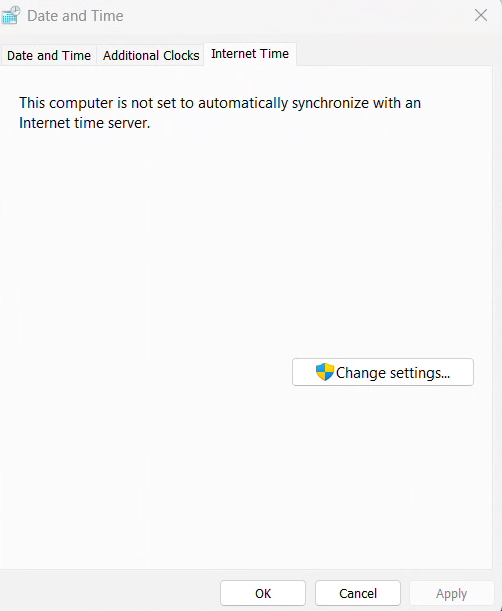
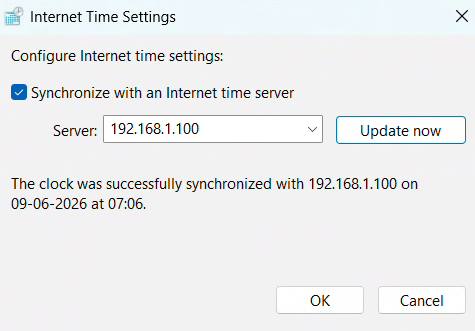
Under Internet Time press on Change settings... and fill in the IP address of the ATTU. Press on Update now.
After going back to Internet Time tab you will see when the computer is set to synchronize next time. This will give you indication if anything in Windows Registry needs to be changed.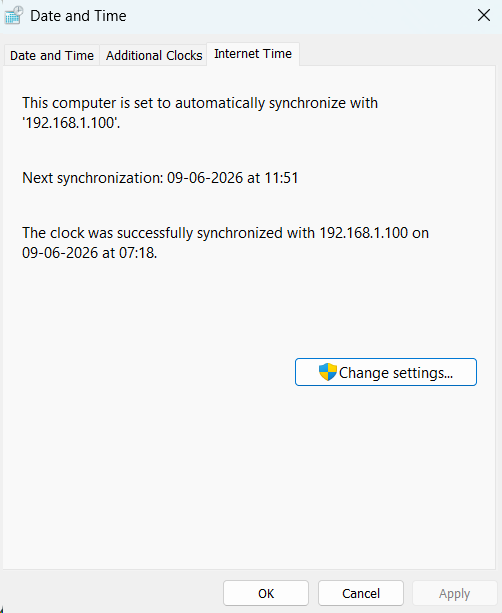
⚠ Disclaimer - Windows sync interval and clock drift
By default, Windows synchronises its clock only once per week (every 604,800 seconds). On a vessel or survey operation where the PC clock must stay accurate, this is insufficient and could cause the PC clock to drift noticeably between sync cycles.
To reduce the sync interval, you must edit the Windows Registry. Editing the Registry incorrectly can cause system instability, proceed with care and create a backup before making changes.
Open Registry Editor (regedit) and navigate to:
HKEY_LOCAL_MACHINESYSTEMCurrentControlSetServicesW32TimeTimeProvidersNtpClient
Change the SpecialPollInterval DWORD value from the default 604800 (7 days) to a shorter interval in seconds, for example:
3600 = sync every 1 hour
900 = sync every 15 minutes
After editing, restart the Windows Time service:
net stop w32tm && net start w32tm
Note: Values below 64 seconds are ignored by Windows. A value of 900–3600 seconds is recommended for survey operations.
Q: My NTP sync is dropping or the PC clock is jumping. What should I check?
- Firewall / network: Ensure UDP port 123 is open between the PC and the ATTU MKII. Offshore vessel networks commonly block NTP traffic.
- ATTU time source: Confirm the ATTU web interface shows GPS [Synced] or NTP [Synced], not RTC.
- IP reachability: Run
ping <ATTU_IP>from the affected PC. If ping fails, check network routing and switch configuration. - Multiple NTP sources: If Windows is configured with more than one NTP server (e.g., time.windows.com in addition to the ATTU), Windows may switch between sources causing jumps. Use
/syncfromflags:manualwith only the ATTU IP to prevent this. - Sync interval: If the clock drifts noticeably between syncs, reduce the
SpecialPollIntervalregistry value as described above.