
Q: Can I use EIVAHWConfig with ATTU MKII?
No. EIVAHWConfig is only compatible with ATTU MKI (the first-generation unit). It will not discover or communicate with ATTU MKII.
ATTU MKII is configured through its built-in web interface. To access it, connect your PC to the Ethernet 2 port on the ATTU MKII and open a browser with the following default IP address:
Default IP (Ethernet 2): 10.10.114.114
Make sure your PC is on the same subnet (e.g. 10.10.114.x, subnet mask 255.255.255.0).
Note: Ethernet 1 is configured for DHCP by default from the factory. Ethernet 2 uses the static IP above.
A successor to EIVAHWConfig with ATTU MKII support is planned for release — this article will be updated when it becomes available.
Q: I don't know the IP address of my ATTU MKII - how do I find it?
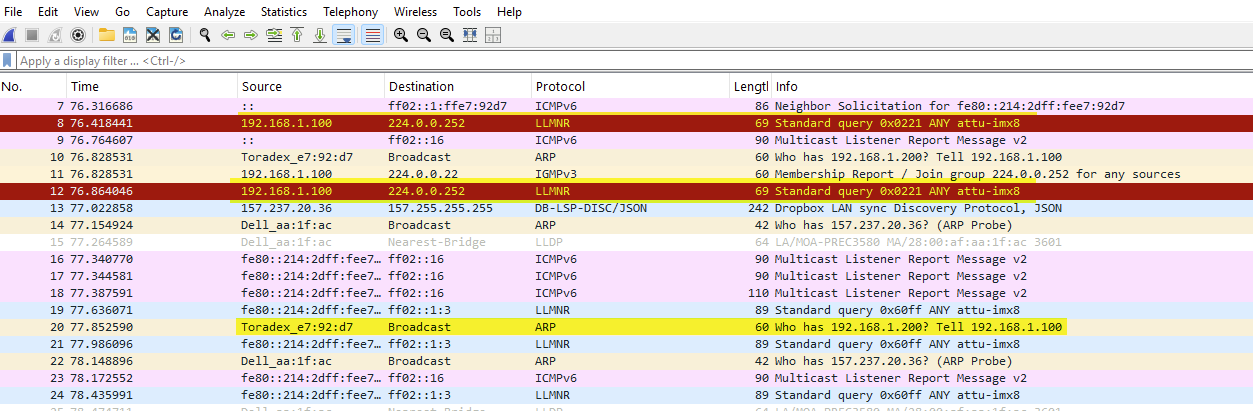
If the IP address has been changed from the default and is unknown, you can recover it using Wireshark:
- Connect your PC to the ATTU MKII with an Ethernet cable
- Open Wireshark and start capturing on the relevant network interface
- Power-cycle the ATTU MKII
- During boot, filter for packets containing "toradex". The ATTU MKII's IP address will appear in the boot sequence traffic. Sometimes this is not shown on powering up so unfortunately, user will need to do multiple powering cycle of the equipment.
Q: Can I use ATTUMon (AttuMon.exe) with ATTU MKII?
No. ATTUMon currently only supports ATTU MKI. It is not compatible with ATTU MKII, and there are no immediate plans to add support.
If you need PC time synchronisation using ATTU MKII as a time source, the ATTU MKII does run an NTP service which you can point your PC's NTP client to directly.
If ATTUMon support for ATTU MKII is important for your operations, please contact EIVA support so we can log a feature request.
Q: Which tools and features are supported on ATTU MKII vs ATTU MKI?
| Feature | ATTU MKI | ATTU MKII |
|---|---|---|
| EIVAHWConfig discovery | ✅ | ❌ |
| ATTUMon (PC time sync) | ✅ | ❌ |
| Web configuration interface | ✅ | ✅ |
| GPS / PPS time reference | ✅ | ✅ |