
The Window Layout function allows users to manage how the Helmsman's window has the views arranged on the screen.
Helmsman uses multiple views, such as Map View, Project Tree, Properties, Graph View, Data View etc.
Each operator may organize these views differently depending on the task, for example navigation monitoring, survey control, online QC etc.
Window Layout tools make it possible to save, load or reset the way the views are arranged on the Helmsman window. After the layout is saved, it can be loaded later to restore the same workspace for each desired .hmp file.
The layout is stored in C:\ProgramData\EIVA\Helmsman\Layout, as a *.wlt file.
This helps operators quickly switch between predefined configuration if the views configuration has to be changed.
Using windows layouts improves workflow efficiency because the operator does not need to manually rebuild every time Helmsman is opened or when switching between tasks.
Below can be seen where the Window-layout feature is located in the Main bar and what options does include:
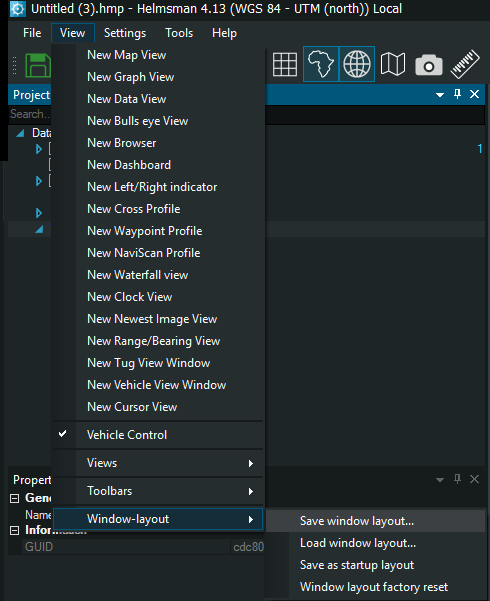
Fig 1. Window Layout options
Save window layout... - stores the current arrangement of almost all open views:
1.The following type of views: Project Tree, Properties, Job List, Log Window, Undo/Redo history, KP Axis, Long Profile, Video Window, Event Window, Event Properties, External References, Alarm Window, Rig Move window are saved as per the user preferences (position and size of each view, docking configuration and view placement). The only view that Helmsman doesn't save in the save window layout is the Event collection tablet
Load window Layout - restores a previously saved layout
When selected, Helmsman loads the saved configuration and rearranges the views to match the stored layout. All views return to their saved positions and sizes.
Save as startup layout - defines the current window layout as the default configuration that Helmsman will load automatically when the software starts. After setting this option, everytime Helmsman is launched, the interface will open with the same window arrangement.
Window layout factory reset - restores the Helmsman interface to the default layout provided by the software. This removes all custom view arrangements and returns the interface to its original configuration.