
The Kongsberg M3 can be used with NaviScan in two modes: imaging mode (forward-looking sonar, FLS) and profiling mode (multibeam). Each uses a different driver and data format.
Imaging mode (FLS) — .imb data format
- In NaviScan Config, choose Equipment > Add sensor > Sidescan / Forward-looking Sonar.
- Use the Flexview FLS driver, set to receive the .imb data format.
- Communication is on TCP 127.0.0.1, using the port defined in the Kongsberg manual.
- Set the Command port (used to send commands to the sonar) — this must be set.
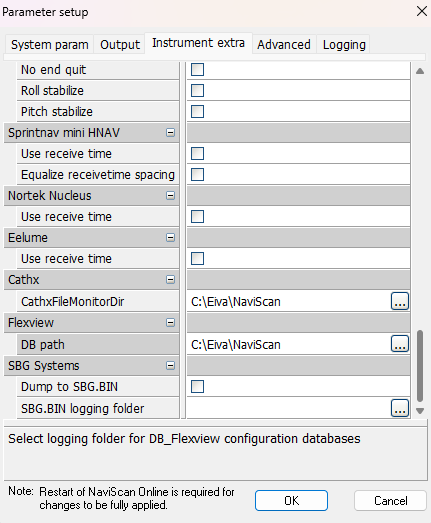
Workaround to get .imb into NaviScan: NaviScan expects the Flexview database files from Kongsberg Discovery (for example DB_FlexView@0700), but on the M3 they are named DB_M3@0700. The workaround is to copy the M3 databases into the folder and rename them as Flexview.
To choose the folder go under Project Parameters > Instrument extra and navigate to Flexview tab:
Profiling mode (multibeam) — .all data format
- In NaviScan Config, choose Equipment > Add sensor > Multibeam Echosounder / Subsea Laser.
- Use the EM710/2040/302/122/70/M3 driver. There are two drivers, depending on whether it is a single or dual head.
- Communication is on UDP, using the port defined in the Kongsberg manual.
Streams and default ports
| Stream | Protocol | Direction | Default port | Trigger |
|---|---|---|---|---|
| IMB 32-bit (imaging) | TCP | NaviScan → sonar (client → server) | 20001 | Auto on connect |
| IMB amplitude | TCP | NaviScan → sonar | 21001 (IMB port + 1000) | Auto on connect |
| .ALL profiling | UDP | Sonar → NaviScan (push) | User-defined (e.g. 20002) | — |
Note: The Kongsberg M3 can be time-synchronized from NaviPac, but the recommendation is to time-sync it directly from the GNSS receiver using ZDA + PPS.